
Key takeaways:
- Mavvrik now tracks agent costs across more of the stack. Python/JavaScript SDKs, Langfuse, LiteLLM Proxy, and self-hosted n8n can all feed telemetry into a single cost and usage model, so teams don’t need one instrumentation approach for every agent.
- Agent cost is more than the model bill. A single customer interaction can span multiple model calls, retrievals, paid APIs, and tool executions; Mavvrik ties all of that activity together so finance sees the full cost of completing a task, not just the final LLM charge.
- Cost can be attributed to the business activity that caused it. Usage can be mapped to customer, user, session, application, use case, and region, enabling questions like “what does this agent cost per customer?” rather than just “what did we spend on models?”
- Non-LLM and negotiated costs are included too. Metered services like OCR, search APIs, and storage can be added alongside model usage, and customer-configured pricing cards let reporting reflect actual negotiated LLM rates instead of public list prices.
Best for: FinOps teams, finance leaders, AI platform teams, and engineering organizations operating production agents across multiple models, frameworks, gateways, and workflow platforms.
As AI agents proliferate across the enterprise, the data needed to understand their costs is becoming fragmented across applications, frameworks, gateways, models, and workflow platforms. This creates a significant challenge for finance, FinOps, and engineering teams trying to determine what agents actually cost, what is driving that spend, and where it belongs.
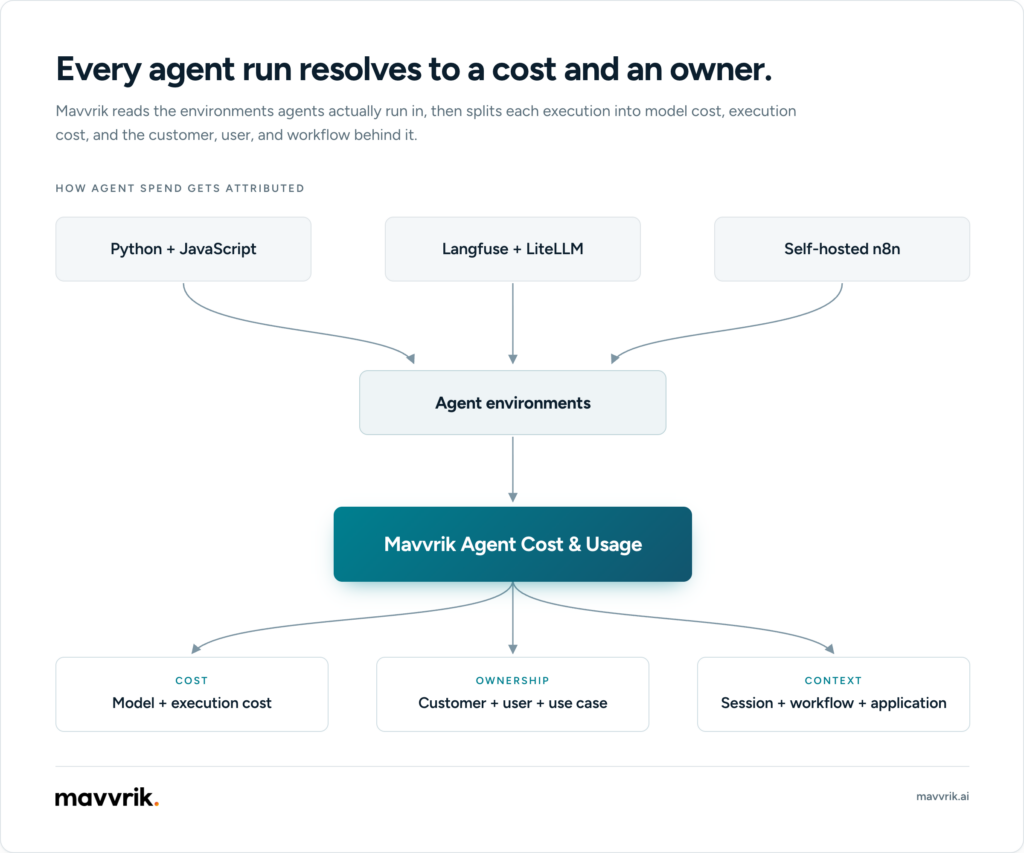
Mavvrik can now bring telemetry from more of those environments into a common cost and usage model, including Python and JavaScript/TypeScript applications, Langfuse, LiteLLM Proxy, and self-hosted n8n. This makes it possible to calculate agent costs, understand the activity behind them, and attribute the spend to the customers, users, applications, and use cases that generated it.
A production agent rarely makes one model call and stops. It may use several models, retrieve data, call external services, execute tools, and move through multiple workflow steps before completing a task. The cost of that activity may be distributed across several systems, while the context needed to explain it lives somewhere else.
For finance and FinOps, the question is no longer simply, “How much did we spend on an LLM?” It is, “What did this agent cost from beginning to end, what drove that cost, and which customer, user, application, or business use case should it be attributed to?”
What this expansion adds
Mavvrik is expanding the breadth of signals that can feed Agent Cost & Usage, giving enterprises more ways to connect agent execution with financial and business context.
The expansion includes:
- More ways to bring agent telemetry into Mavvrik through Python and JavaScript/TypeScript SDKs, Langfuse, LiteLLM Proxy, and self-hosted n8n
- Attribution of model usage and cost to customers, users, sessions, applications, requests, and business use cases
- Execution-level context that helps teams identify which operations and model calls generated the cost
- Support for paid non-LLM consumption such as OCR, APIs, document processing, storage, and other metered services can be included alongside model cost.
- Customer-configured pricing cards that allow cost reporting to reflect negotiated LLM rates at tenant, workspace, team, or agent level.
Agent cost is bigger than model cost
Tracking model spend is relatively straightforward when an application makes a few isolated API calls.Agentic systems change that.
Consider a customer-support agent.
A single customer request could trigger:
- a model call to understand the request;
- a vector search to retrieve account information;
- a paid eligibility or CRM API;
- another model call to decide what action to take;
- a tool execution;
- a final model call to generate the response.
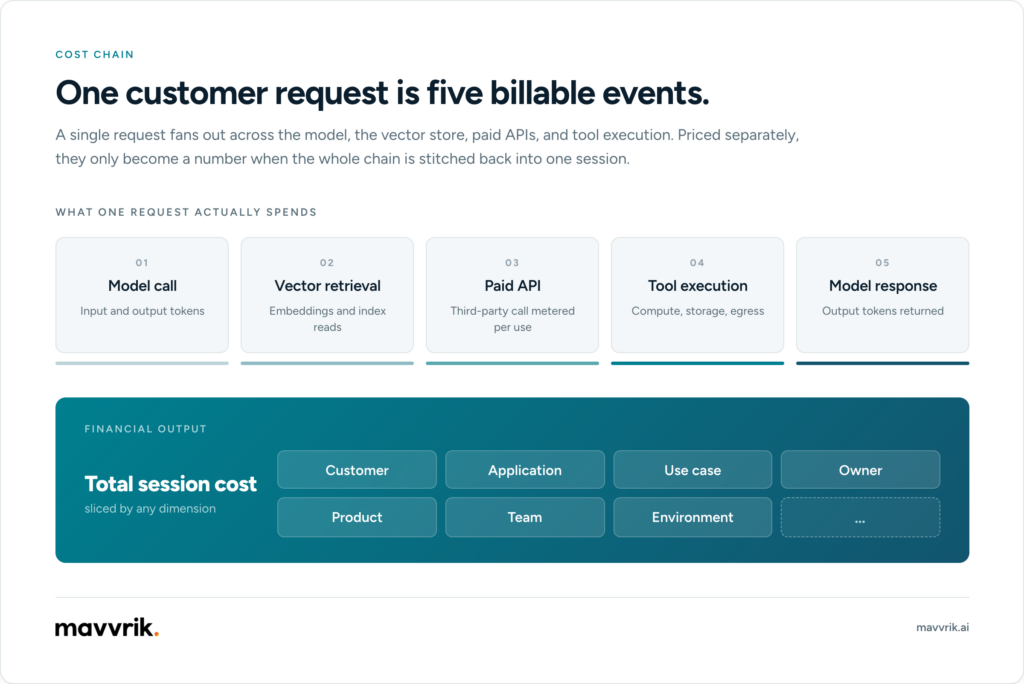
Looking only at the final LLM bill tells finance how much the models cost. It does not explain the cost of completing the customer interaction, who generated the activity, which customer it supported, or which execution step caused an increase.
That is the gap Mavvrik’s Agent Cost & Usage capabilities address within its broader Full Stack AI Cost Governance approach.
More ways to bring agent data into Mavvrik
Not every enterprise agent is built the same way.
Instead of requiring every workload to follow one instrumentation model, Mavvrik supports several integration paths so teams can use the telemetry path that matches how the agent already runs.
| Your environment | Integration |
| Python agent application | Mavvrik Python SDK |
| JavaScript / TypeScript application | Mavvrik JavaScript / TypeScript SDK |
| Existing Langfuse project | Langfuse integration |
| Model traffic through LiteLLM Proxy | LiteLLM Proxy integration |
| Self-hosted n8n workflows | n8n integration |
The goal is simple: use the telemetry path that matches how the agent already runs.
Python and JavaScript / TypeScript applications
Mavvrik’s SDKs observe supported AI libraries without requiring teams to replace their existing model-provider or framework calls with Mavvrik-specific APIs.
For supported calls, Mavvrik can capture telemetry exposed by the underlying library, including:
- provider and model;
- cached and reasoning tokens where available;
- input and output usage;
- duration;
- success and error information;
- trace relationships;
- pricing inputs used to calculate cost.
Mavvrik’s supported stack now covers a wider range of model platforms and providers, including OpenAI, Anthropic, Amazon Bedrock, Azure OpenAI, Google Gemini and Vertex AI, Perplexity, and others.
Agent-framework support includes technologies such as LangChain, LangGraph, CrewAI, Agno, Semantic Kernel, OpenAI Agents, and Microsoft Agent Framework, with coverage varying by SDK language.
Selected vector databases, web frameworks, and serverless runtimes are supported as well.
Existing Langfuse environments
Some organizations already send agent telemetry to Langfuse.Those teams do not need to add the Mavvrik SDK simply to calculate agent cost.
Mavvrik can connect to a Langfuse project, discover configured agent identities, collect supported observations, and use model and usage information for Mavvrik cost reporting.User and session information already attached to the Langfuse trace can also support attribution and session analysis.
Langfuse remains the agent-observability environment. Mavvrik uses the available operational telemetry as another source for agent cost and usage management.
LiteLLM Proxy
Enterprises routing model traffic through LiteLLM Proxy can connect that gateway directly to Mavvrik. The LiteLLM connection identifies gateway-level activity, while supported request metadata can identify the individual agent that generated the consumption.
When agent identity is available, teams can analyze both gateway-level activity and per-agent cost attribution. Without it, usage can still be reported against the LiteLLM connection as unattributed activity. Learn more about how to bring LiteLLM cost data into a wider AI cost view.
Forecast the full AI cost stack, not just token spend
Tokens are visible and easy to count, but they are only one part of the AI operating base. The report found that data platform overages were the most frequently cited source of unexpected AI cost, ahead of LLM token costs.
A finance-ready forecast therefore needs to include the full delivery stack: model and API consumption, retrieval and data platforms, networking, cloud and on-prem compute, GPU utilization, agent orchestration, and the engineering effort required to operate the system.
Self-hosted n8n
Mavvrik also supports self-hosted n8n agent workflows.
The integration can capture workflow executions and supported activity including workflow nodes, AI model calls, embeddings, vector retrievals, memory operations, and tool executions.
That brings low-code agent workflows into the same Agent Cost & Usage model as conventional applications.
Connect agent cost to the business activity behind it
Knowing which agent consumed $1,000 is useful. Knowing why it consumed $1,000 is significantly more useful.
Mavvrik business context lets teams associate captured activity with the business transaction that generated it.
Supported context can include:
- customer;
- user;
- session;
- application;
- use case;
- request;
- region;
- additional tags.
Context is set around the relevant request, workflow, session, or job and inherited by supported activity inside that boundary.
That enables questions such as:
- How much does the support agent cost per customer?
- What is our agent spend per user?
- Which applications are responsible for the largest share of AI consumption?
- Which business use cases are driving cost growth?
- What did one customer session cost from beginning to end?
This changes the conversation from technical consumption to cost ownership.
See the execution that produced the cost
Agent Cost & Usage connects financial data with the execution activity behind it.In Mavvrik, teams can use Agentic → Cost to understand spend and allocation, then inspect Agentic → Sessions to see the operations that generated that activity.
With supported framework instrumentation, framework-level activity and the model calls beneath it can be correlated in the same execution trace.
That makes it easier to investigate questions such as:
- Which step made an expensive model call?
- Was the cost driven by one large operation or several smaller calls?
- Which model was used?
- How long did the operation take?
- Did the operation succeed or fail?
- Which session, customer, or use case did it belong to?
The objective is not to turn Mavvrik into a general-purpose APM system. It is to provide the execution evidence needed to understand agent cost.
Add the paid services surrounding the LLM
Model calls are not always the only billable part of an agent workflow.
A document-processing agent might use:
- an OCR service charged per page;
- a paid search API;
- a document extraction service;
- external business APIs;
- storage;
- other per-unit services.
Mavvrik’s metered usage capability allows those resources to be recorded alongside automatically captured model consumption. Together, they provide a more complete cost picture for the workflow without requiring teams to manually recreate model usage that Mavvrik already captures.
For a broader framework, see how to track AI costs from usage logs to cost-to-serve.
How each cost source enters Mavvrik
| Cost or context source | How it enters Mavvrik |
|---|---|
| Supported model activity | Captured through an SDK or supported integration |
| Agent execution activity | Captured where supported by the framework or integration |
| Paid OCR, search, APIs, and other services | Added through metered usage |
| Negotiated model rates | Applied through customer-configured pricing cards |
| Business context | Supplied around the relevant request, workflow, session, or job |
Use the LLM rates your organization actually pays
Public model prices do not always reflect enterprise contracts. An organization may negotiate different rates with an LLM provider or apply different pricing arrangements across business units.
Mavvrik now allows customers to configure LLM pricing cards for their own commercial rates.This allows agent cost reporting to reflect the organization’s actual pricing arrangement instead of depending exclusively on default model pricing.
What can finance and FinOps investigate?
The expanded capabilities give finance and FinOps a more useful set of questions to work from.
Understand cost per agent
See which agents account for the most spend and how their consumption changes over time.
Understand cost per session or workflow
Inspect the activity associated with a specific customer interaction or workflow rather than looking only at an aggregate model bill.
Establish cost ownership
Attribute consumption to customers, users, applications, business use cases, teams, or other reporting dimensions.
Investigate cost changes
Determine whether a change came from the model being used, increased usage, a particular customer or use case, or additional paid workflow services.
Support showback and chargeback
Use business context to connect agent activity with the organization or customer responsible for generating it.
Reconcile engineering and finance
Give engineering the execution detail it needs while giving finance and FinOps the cost and attribution context required for financial management.
A common enterprise scenario
Consider an enterprise running a Python-based LangGraph support agent, a TypeScript application, LiteLLM-routed model traffic, an existing Langfuse environment, and self-hosted n8n automations. Its workloads use several model providers, call external paid APIs, and may be subject to negotiated rates.
Without a common cost layer, finance must reconcile different telemetry sources, model providers, agent identities, business dimensions, non-LLM charges, pricing arrangements, and execution records.
Mavvrik brings those inputs into a common cost-management model. The applications and platforms continue doing the jobs they were designed for, while Mavvrik provides the cost and attribution layer across them.
From model bills to agent cost ownership
The next stage of AI cost management is not simply tracking more tokens. Production agents combine models, tools, external services, workflows, users, customers, and business processes.
Finance needs to know what those systems cost. Engineering needs to know what generated the cost. And the business needs to know who owns it.
Mavvrik’s expanded Agent Cost & Usage capabilities connect those views, helping enterprises understand what their agents cost, what generated the spend, and where that cost belongs.
FAQs
What does Mavvrik Agent Cost & Usage do?
It combines supported agent telemetry, model usage, pricing, execution activity, business context, and optional metered non-LLM usage to help teams understand what an agent costs and who or what generated that spend.
Do I need the Mavvrik SDK for every agent?
No. Python and JavaScript/TypeScript applications can use the Mavvrik SDK. Organizations with supported telemetry already available through Langfuse or LiteLLM Proxy can connect those environments directly. Self-hosted n8n uses its own Mavvrik integration.
What business dimensions can I use for cost attribution?
Supported context includes customer, user, session, application, use case, request, region, and tags.
Does Mavvrik capture only LLM cost?
No. Supported AI usage can be priced automatically, while paid non-LLM resources such as OCR, external APIs, document processing, storage, and other metered services can be added to the workflow cost.
Can we use our negotiated LLM prices?
Yes. LLM pricing cards can apply customer-specific rates at tenant, workspace, team, or agent level.
Does Mavvrik collect prompt and response text?
Prompt and response text is not required or sent by default for standard SDK cost reporting.
Does Mavvrik replace Langfuse, LiteLLM, n8n, or agent frameworks?
No. Those products continue performing their existing observability, gateway, workflow, or application functions. Mavvrik provides a cost and attribution layer across supported agent environments.
Written by:

Lindsey Tishgart
VP of Marketing @ Mavvrik
Lindsey is VP of Marketing at Mavvrik, where she focuses on the growing cost of AI and how enterprises can scale it responsibly. She writes and thinks about AI economics: how unchecked spend creates financial and operational risk, how AI investment connects to margin and ROI, and how finance, engineering, and AI leaders can bring real governance to a problem most companies are still ignoring.