


Key takeaways:
- Chargeback bills a business unit for the cloud, IT, GPU, or AI resources it consumes. Showback reports those costs without moving them onto the business unit’s budget.
- Showback builds cost awareness. Chargeback creates financial accountability and supports cost recovery.
- The strongest FinOps strategy uses both, with showback validating the cost model before chargeback moves money.
- GPU chargeback and AI workload cost attribution need automation because usage spans tokens, GPU time, memory, Kubernetes, data platforms, networking, and agent workflows.
- Clear policies, budget alerts, shared-cost rules, and finance alignment matter as much as the allocation data itself.
A finance lead looking at the monthly cloud report may see a GPU line item with no clear owner, model API spend sitting under one shared account, and a spreadsheet trying to map costs back to business units during month-end review.
That is usually when the chargeback vs showback conversation becomes practical. The right model gives finance, engineering, and business teams a shared way to understand who is driving spend, what it supports, and where accountability should sit.
What Is Chargeback?
Chargeback is a cost allocation model where a department, business unit, product team, or customer is billed for the technology resources it consumes. In FinOps, that often includes cloud costs, shared services, Kubernetes, SaaS, data platforms, and increasingly GPU or AI infrastructure.
The FinOps Foundation’s Chargeback & Finance Integration guidance defines the core distinction clearly: chargeback sends expenses to a product or department P&L, while showback shows those charges while keeping them on a centralized budget. The same guidance notes that tagging, account strategy,
What Is Showback?
Showback reports technology usage and cost to the teams consuming it, without billing them directly. A showback report might tell engineering that its staging environments drove a certain share of compute spend, or tell a product leader that one customer segment is creating higher cost-to-serve than expected.
Showback is strongest when it is treated as a proving ground for the allocation model. It lets finance and engineering test ownership rules, identify costs teams may dispute, and clean up tagging or usage data before those numbers start affecting budgets.
It is especially useful when allocation rules are still being tested.
Chargeback vs Showback: The Critical Differences
| Dimension | Chargeback | Showback |
|---|---|---|
| Financial impact | Costs move to the owning business unit, product, or customer budget | Costs remain on a central IT or platform budget |
| Accountability | Enforced through budget impact | Encouraged through visibility and review |
| Behavior change | Stronger, because usage affects spend ownership | Gradual, because teams can see patterns before billing begins |
| Cost recovery | Supports internal recovery, client billing, and margin analysis | Does not recover cost directly |
| Setup complexity | Higher, needs allocation rules, finance workflow, and dispute handling | Lower, needs trusted reporting and ownership mapping |
| Cultural risk | Higher if teams do not trust the allocation model | Lower, but reports can be ignored |
| Recommended starting phase | After ownership and allocation data are trusted | First phase for education, validation, and alignment |
Neither model is automatically more mature. The better choice depends on your accounting policy, cost data quality, and how much control each team has over the resources being allocated
Pros, Cons, and Common Mistakes of Showback
Pros
Showback is easier to start because it does not require internal billing. It helps finance, engineering, and product teams agree on the cost model before money moves. It also gives business units a way to see cloud costs, usage trends, and cost optimization opportunities without creating immediate budget friction.
Cons
Showback can lose influence if nobody is accountable for action. Reports may be reviewed once and ignored. Shared infrastructure costs can also create disputes if the allocation method is unclear, especially when one GPU cluster, Kubernetes namespace, or data platform supports multiple teams.
Common mistakes
1. Sending reports without ownership
A showback dashboard needs a responsible owner for each meaningful cost area. Otherwise, teams see spend but do not know who should act on it.
2. Reporting spend without enough detail
A monthly cloud total does not help a product team understand what changed. Break showback down by business unit, product, environment, workload, model, tenant, or customer where the data allows.
3. Waiting for perfect tags
Showback can begin before the model is perfect. Use early reports to find missing tags, unclear owners, and disputed shared costs, then improve the model each cycle.
4. Letting showback become a holding pattern
Showback should build confidence in the allocation model. Once ownership is clear and the cost affects a budget, production workloads may be ready for chargeback.
Pros, Cons, and Common Mistakes of Chargeback
Pros
Chargeback gives cost ownership a financial consequence. It supports cost recovery, internal billing, client billing, and product margin management. It also makes unit economics easier to defend because cost-to-serve can be tied to the product, customer, feature, tenant, or business unit that consumed the resource.
Cons
Chargeback only works when teams believe the numbers. If a GPU cluster, Kubernetes namespace, or model API key is shared across teams without reliable ownership metadata, the chargeback model will create disputes instead of accountability.
A chargeback model built on incomplete tags, rough allocation percentages, or unclear shared-cost rules will create pushback. Finance also needs a repeatable process for approvals, disputes, budget mapping, and ERP or invoicing workflows.
Common mistakes
1. Billing before teams trust the model
Introduce chargeback only after teams have seen the numbers and understand how costs are assigned. Start with showback, review the data with owners, explain the allocation rules, and agree on a process for resolving disputes.
2. Ignoring shared costs and discounts
Support, networking, observability, storage, idle GPU capacity, reserved instances, and savings plans all need clear rules. Decide what stays central, what gets allocated by usage, and what gets shown without billing.
3. Charging teams for costs they cannot influence
A team should be able to see the cost, understand what created it, and change usage before the charge hits a budget. Alerts, forecasts, and workload-level detail make chargeback easier to accept.
4. Keeping reconciliation manual
Manual chargeback creates delays, errors, and low trust. This gets worse with GPU and AI workloads where allocation may depend on job duration, utilization, memory, Kubernetes metadata, token usage, model calls, and customer context.
5. Using one allocation rule for every workload
Account-level tagging may work for some cloud costs. Shared GPU clusters, AI inference, agent workflows, and shared data platforms often need more granular allocation signals. Chargeback gets stronger when the rule matches how the resource is consumed.
How to Evaluate Chargeback vs Showback Readiness
Before choosing chargeback, showback, or both, evaluate your cost allocation model across five areas.
| Readiness area | What to check | What it tells you |
|---|---|---|
| Ownership clarity | Can each account, namespace, workload, model, GPU job, or customer environment be mapped to a responsible owner? | Use showback if ownership is still unclear. Move toward chargeback when teams can validate the costs assigned to them. |
| Data quality | Are tags, labels, billing exports, usage metrics, token data, and scheduler metadata complete enough to support repeatable reporting? | Use showback while data is being cleaned up. Use chargeback when the allocation model is consistent enough for finance review. |
| Shared-cost logic | Are shared platforms, idle capacity, networking, storage, support, and reserved resources allocated through clear rules? | Keep some shared costs central, use showback for visibility, or charge back when consumption can be measured fairly. |
| Finance workflow | Can the model connect to budgets, P&Ls, ERP systems, invoicing, or internal reporting? | Chargeback needs finance process alignment. Showback can start before finance workflows are fully connected. |
| Actionability | Can teams change usage, set alerts, or optimize costs before the bill arrives? | Costs should be visible and manageable before they become billable. |
When to Use Showback, Chargeback, or Both
Use showback when your cost model is new, when tagging coverage is inconsistent, or when business units need education before budget accountability begins. A practical pattern is to run showback for one or two billing cycles, review the numbers with owners, and refine the rules before formal billing.
Example: Equinox managed more than 30 AWS accounts across multiple business units, which made consolidated reporting and cost allocation difficult. Teams also lacked current cloud spend visibility and relied on manual data collection. Mavvrik aggregated AWS, Azure, and Google Cloud cost data into a centralized view, then supported automated allocation and reporting by business unit. For an environment like this, showback gives finance, engineering, and business leaders a trusted baseline before chargeback rules are expanded.
Use chargeback when ownership is clear and the cost needs to be recovered. This fits shared GPU pools, internal developer platforms, customer-facing AI products, MSP environments, and product lines where cloud costs affect margin.
Example: A Mavvrik GPU chargeback case shows the AI version of that problem. An MLOps company was running GPU workloads across on-prem clusters, GCP, Azure, and AWS. Manual GPU chargeback created billing errors, operational overhead, and slow reconciliation. The team moved to centralized GPU and CPU visibility with automated allocation by project, client, and environment, giving project leaders self-service dashboards and improving client billing confidence. As one Cloud FinOps Engineer put it, “Chargeback has become an essential part of how we run infrastructure. It’s fundamental to client billing and internal accountability.”
Use both when the environment is mixed. For example, a platform team may use showback for experimental AI workloads while charging back production GPU usage to the business units consuming reserved capacity.
Example: A SaaS data platform might run model experiments and production inference on the same infrastructure. Experiments can stay under showback so engineering can understand cost patterns without creating budget friction too early. Production inference can move to chargeback because it supports paying customers and needs cost-to-serve visibility. Mavvrik’s cost-to-serve guidance supports this model by connecting infrastructure consumption to customers, products, features, or internal teams, which creates a more defensible foundation for showback and chargeback than rough allocation rules.
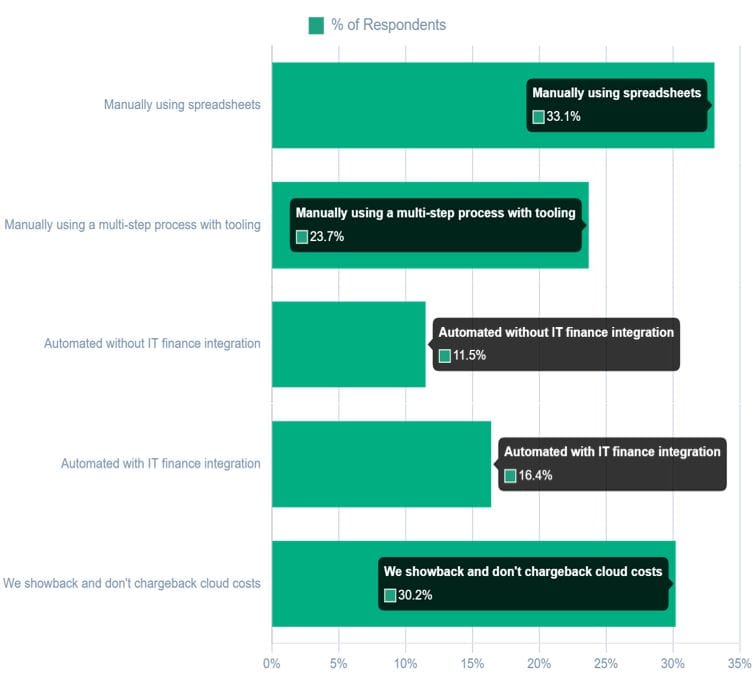
Chargeback maturity is still uneven across FinOps teams. FinOps Foundation data shows that a large share of teams still rely on spreadsheets, manual workflows, or showback-only reporting instead of automated chargeback tied into IT finance systems. That is why the path from showback to chargeback needs to be intentional instead of rushed.
Chargeback and Showback for GPU and AI Workloads
GPU and AI workloads raise the bar for cost allocation. The FinOps Foundation’s State of FinOps 2026 report found that 98% of respondents now manage AI spend, up from 31% two years earlier. The same report named granular monitoring of AI spend, including tokens, LLM requests, and GPU utilization, as the top requested tooling capability.
The cost surface is wider than tokens. Mavvrik and Benchmarkit’s 2025 State of AI Cost Governance report found that data platforms are the top source of unexpected AI spend at 56%, followed by network access costs at 52%. The report also found that 61% of companies already run hybrid AI infrastructure, while only 35% include on-prem AI costs in reporting.
“AI is blowing up the assumptions baked into budgets. What used to be predictable, is now elastic and expensive,” said Sundeep Goel, CEO of Mavvrik.
That changes the chargeback model. GPU chargeback needs to account for GPU hours, memory, utilization, job duration, scheduler data, Kubernetes workload context, project ownership, and customer or business unit mapping. AI workload cost attribution adds model calls, token usage, tool invocations, retries, data retrieval, orchestration, and shared infrastructure, including developer tools like Claude Code cost allocation.
5 Best Practices for Running Chargeback and Showback
- Start with a written allocation policy: Define the cost sources included, the ownership hierarchy, the shared-cost rules, the review cadence, and the dispute path.
- Run a shadow chargeback period: Send the reports as if billing were live, then let business units validate ownership and allocation logic before budgets are affected.
- Automate GPU and AI attribution: Manual review cannot keep up with shared GPU clusters, agent workflows, model calls, Kubernetes workloads, and hybrid infrastructure. Automation matters because the cost signal is created before the invoice arrives.
- Set budgets and alerts: A showback report after month-end is useful, but budget thresholds and anomaly alerts help teams act while there is still time to change usage.
- Review the model continuously: Allocation rules need to evolve as services change, teams reorganize, AI usage grows, or workloads move between cloud and on-prem infrastructure.
For a deeper look at how to structure alerts around AI cost visibility, see AI cost visibility: from monthly totals to financial control.
How Mavvrik Approaches Chargeback and Showback
Mavvrik treats chargeback and showback as part of full-stack financial control across cloud, on-prem, SaaS, Kubernetes, GPUs, GenAI services, and agentic workflows.
For showback, Mavvrik gives teams visibility into spend by business unit, product, feature, customer, tenant, model, or agent. For chargeback, the platform supports automated allocation, budget tracking, anomaly detection, cost recovery, and cost-to-serve analysis across shared infrastructure.
For GPU-heavy environments, Mavvrik GPU Chargeback tracks costs across time, memory, and compute usage, automates allocation to departments, customers, or services, and supports forecasting, cost allocation, and chargeback across cloud, on-prem, or hybrid stacks.
For AI workloads, Mavvrik connects the usage signals that usually sit apart: model provider costs, GPU infrastructure, Kubernetes, data platforms, SaaS tools, and agent workflows. The result is a cost model finance can use for chargeback and engineering can use for cost optimization.
What are the next steps?
Three ways to continue from here:
1. Evaluate your cost allocation maturity
Learn how leading organizations move beyond spreadsheets, tags, and static reports to build allocation models that support chargeback, showback, forecasting, and financial accountability.
Read FinOps Cost Allocation Intelligence →
2. Explore AI and GPU chargeback in practice
See how organizations are allocating GPU capacity, inference costs, and AI infrastructure spend back to the products, customers, and teams driving consumption.
3. See full-stack financial control in action
Mavvrik brings showback, chargeback, budgeting, forecasting, anomaly detection, and cost attribution together across cloud, AI, SaaS, on-prem, and shared infrastructure.
FAQs
What is the difference between showback and chargeback?
Showback reports cloud, IT, GPU, or AI costs to the teams consuming them. Chargeback bills those teams for the costs they generated. In simple terms, showback moves cost information, while chargeback moves financial responsibility.
Should we start with showback vs chargeback?
Start with showback when the allocation model is new or contested. Move to chargeback when teams trust the data, finance approves the rules, and resource owners have enough control to change usage.
What data do you need for chargeback and showback?
You need cost source data, usage data, ownership mapping, shared-cost rules, budget owners, and a reporting cadence. For AI and GPUs, you also need workload-level signals such as GPU time, utilization, token usage, model calls, tool calls, and customer or product context.
How does GPU chargeback work?
GPU chargeback allocates GPU infrastructure costs to the teams, projects, customers, or workloads that consumed capacity. A strong model includes compute time, memory, utilization, job metadata, cloud or on-prem cost, and business ownership.
How does chargeback vs showback support cost optimization?
The chargeback vs showback decision gives cost optimization a clearer owner. Showback shows where spend is happening. Chargeback gives the business a reason to manage it. Used together, they turn cloud costs, GPU spend, and AI workload cost attribution into a repeatable financial control process.

Lindsey Tishgart
VP of Marketing @ Mavvrik
Lindsey is VP of Marketing at Mavvrik, where she focuses on the growing cost of AI and how enterprises can scale it responsibly. She writes and thinks about AI economics: how unchecked spend creates financial and operational risk, how AI investment connects to margin and ROI, and how finance, engineering, and AI leaders can bring real governance to a problem most companies are still ignoring.