

Key takeaways:
- Mavvrik MCP brings cost questions into AI clients you already use. Claude, Cursor, ChatGPT, and Microsoft 365 Copilot can all query the same governed Mavvrik cost data through a read-only, standards-based connection.
- MCP doesn’t replace the dashboard, it adds a conversational layer. Visual analysis, monitoring, forecasting, and policy management still happen in Mavvrik’s dashboard, reports, alerts, and APIs.
- The advantage is the governed data behind the protocol. Any platform can expose an MCP endpoint, but useful answers depend on the scope, quality, allocation, and financial context already built into the cost layer.
- One conversation can span cloud, Kubernetes, model/API, coding assistant, SaaS, commitments, forecasts, tags, and allocation. This lets a cost question move from technical consumption to financial ownership without switching tools.
Best For: FinOps practitioners, Finances & FP&A Teams, Engineering & Platform leaders, IT leaders evaluating conversational AI interfaces for cost data.
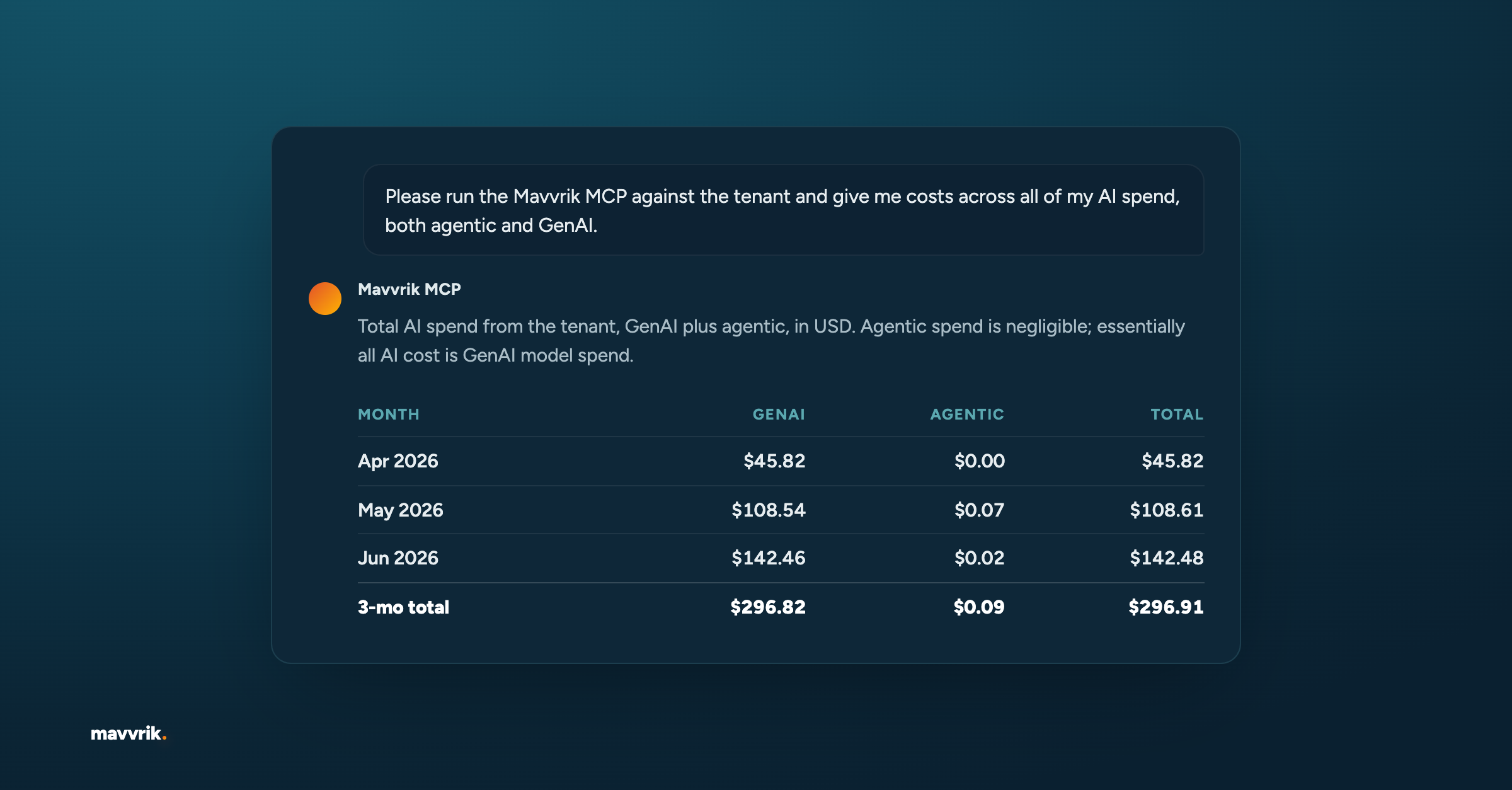
Mavvrik MCP lets you ask cost questions in an AI client and get answers grounded in the data already available in your Mavvrik tenant. You can investigate what changed, what is driving spend, where savings may be available, and which costs still lack clear ownership.
For FinOps, finance, engineering, and platform teams, that can shorten the distance between a cost question and a useful answer. You can start an investigation without building another export or finding the right dashboard filter first.
What is Mavvrik MCP?
MCP stands for Model Context Protocol, an open standard that lets AI applications connect to external tools and data.
Mavvrik MCP is a read-only connection between a compatible AI client and the cost data in Mavvrik. Once connected, you can ask a question such as:
Compare current-month Kubernetes cost with the previous month. Identify the five workloads driving the increase, show the team responsible for each, and rank any related savings recommendations by estimated impact.
Or:
Compare GitHub Copilot and Claude Code cost per active developer by team. Flag teams where spend increased faster than adoption and summarize the three findings that matter most for our next vendor review.
The answer is based on the accounts, services, usage, and cost data available to your Mavvrik user. Your permissions still apply.
Mavvrik MCP does not replace the Mavvrik dashboard. The dashboard remains the place for visual analysis, ongoing monitoring, and policy management. MCP is useful when you have a direct question and want to begin the investigation in a client where you already work.
What cost data can you ask about?
Mavvrik MCP can answer questions across the cost areas available in your tenant, including:
- Cloud cost: Spend, cost drivers, and comparisons across services, accounts, and time periods
- Cloud resources: Inventory and resource-level detail across connected cloud accounts
- Cost variances: The services, accounts, or workloads behind a change in spend
- Anomalies: Unusual cost changes and unexpected spending patterns
- Recommendations: Open savings and optimization opportunities
- Commitments: Reserved Instance and Savings Plan utilization and coverage
- Kubernetes: Cost, efficiency, and utilization across clusters and workloads
- Model and API cost: Token usage and cost across providers such as OpenAI, Anthropic, and Google
- Coding assistant cost: Spend and usage across tools such as GitHub Copilot and Claude Code
- SaaS cost: Spend and usage across supported SaaS integrations
- Budgets and forecasts: Budget position, forecast variance, and projected cost
- Unit economics: Cost to serve by product, feature, customer, team, or another available business dimension
- Tag coverage: Missing tags, policy coverage, and related ownership gaps
- Cost allocation: Allocated and unallocated cost by business segment and allocation structure
Mavvrik’s MCP gives teams a common way to investigate costs that usually live in different systems. A Kubernetes question and a coding assistant question can begin in the same conversation and use the same underlying Mavvrik data.
If other cost platforms offer MCP, what is different here?
MCP is becoming a common way to bring cost data into AI workflows. The protocol is useful, but an endpoint alone does not make the answer useful. The answer depends on the scope, quality, allocation, and financial context of the data behind it.
Mavvrik MCP sits on top of the same governed cost layer used across the platform. That gives a user one place to ask about cloud, Kubernetes, AI models and APIs, coding assistants, SaaS, commitments, forecasts, tags, and allocation. The conversation can follow a cost from technical consumption to financial ownership without switching between separate cost tools or rebuilding context from raw billing data.
This is the competitive position: Mavvrik brings the economics of the full technology estate into the AI workflow. MCP is one interaction layer for that intelligence, alongside dashboards, reports, alerts, and APIs. The underlying value is a connected view of what the business is spending, why it changed, who owns it, and what to do next.
How does the connection work?
Setting up the Mavvrik MCP server is deliberately light because the cost data and access model already live in Mavvrik. To get started, visit: Connecting the Mavvrik MCP Server.
A workspace administrator adds and publishes the remote connector once. Each user clicks Connect, signs in to Mavvrik, and authorizes access from their own account. They can then ask their first cost question in the AI client.
There is no new cost pipeline to build and no second set of permissions to maintain. The connector uses the data, tenant, and user access already managed in Mavvrik.
After that:
- Questions run against the Mavvrik tenant connected to the authenticated user.
- Answers are limited to data that user can access in Mavvrik.
- The AI client does not receive direct access to cloud accounts, Kubernetes clusters, or SaaS platforms.
- MCP activity is recorded for troubleshooting and auditability.
The connector reads data that Mavvrik already has. It does not create another source of cost data or bypass existing access controls.
Which AI clients work with Mavvrik MCP?
Mavvrik supports connection guides for:
Because Mavvrik MCP uses a standard remote MCP endpoint, other compatible hosts may also be able to connect.
How should you ask a cost question?
You do not need a complicated prompt. A useful question usually includes five things:
- The cost area you want to investigate
- The time period
- The way the answer should be groups
- The number of results you want
- The format that would be easiest to use
A simple pattern is:
Show [cost area] for [time period], grouped by [dimension], limited to [top number], with [summary, table, or drivers].
For example:
Show Kubernetes cost for the last 30 days, grouped by cluster. Rank the top five clusters by cost and summarize the main drivers.
The point is clarity. Name the question you are trying to answer and give it a boundary.
What questions can finance, FinOps, and engineering ask?
Different teams often look at the same cost from different angles.
Finance
- What was our Anthropic API spend by team this month?
Engineering
- Which team drove the increase in Claude API spend this week?
Platform and AI teams
- Compare cost per active developer across GitHub Copilot and Claude Code.
FinOps
- Which resources costing more than $500 a month are missing required tags?
Other useful starting questions include:
- Compare actual technology spend with forecast for the current month. Show the five largest unfavorable variances and project the month-end exposure if the current run rate continues.
- Which products or teams saw cost to serve increase while usage stayed flat? Break the change into cloud, Kubernetes, and model API cost.
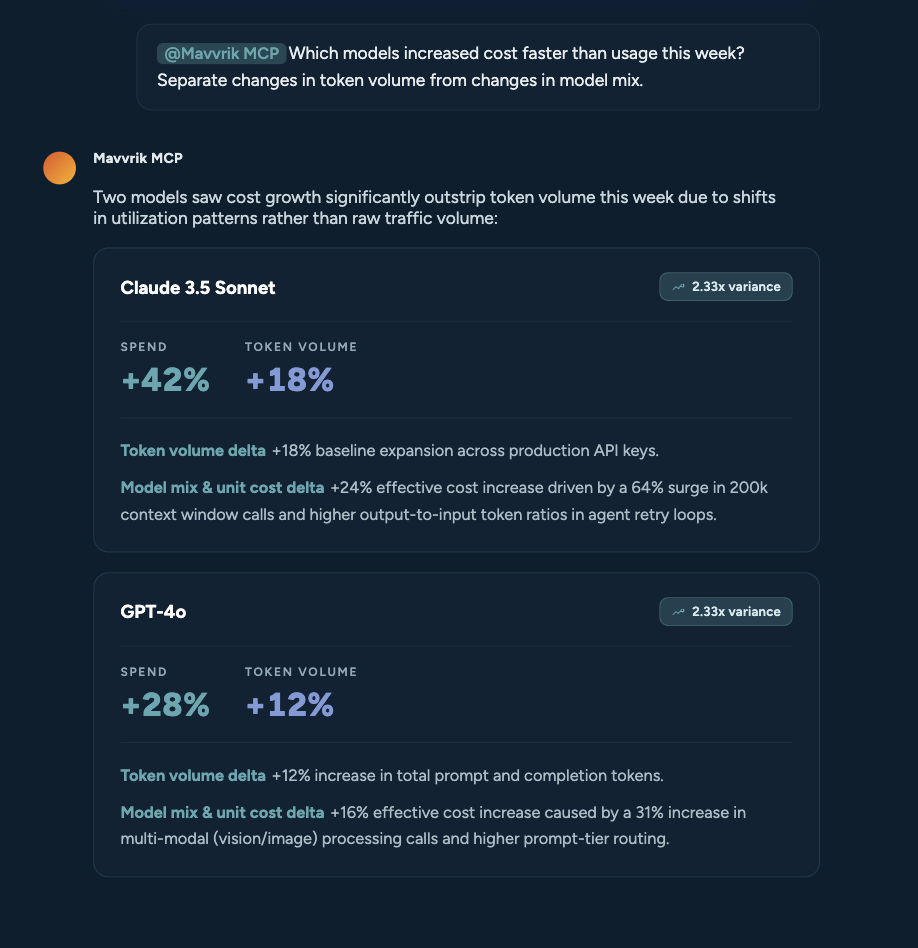
- Find the models with the largest week-over-week cost increase. Separate changes in token volume from changes in model mix, then attribute the spend to teams and workloads.
- Review Reserved Instance and Savings Plan coverage against recent demand variability. Identify the largest gaps and the workloads where a new commitment would carry the least utilization risk.
- How much SaaS spend is still unallocated to a cost center? Rank the largest gaps and show the ownership or tagging information available for each.
- Build a five-point executive brief on technology spend this quarter: total spend, forecast variance, largest anomalies, savings available, and cost without a clear owner.
What deeper workflows can Mavvrik MCP support?
The most valuable use cases go beyond retrieving a number. They connect several cost questions into a decision workflow.
Prepare an executive cost briefing
Ask Mavvrik MCP to summarize total technology spend, material variances, forecast risk, savings opportunities, and ownership gaps in a consistent format. Then follow up on the two or three movements that need executive attention.
Investigate AI unit economics
Compare model, API, GPU, and supporting infrastructure cost by team, workload, product, feature, or customer when those dimensions are available in Mavvrik. This helps teams see whether increased AI activity is improving the economics of the service or quietly eroding margin.
Review coding assistant economics
Compare vendor cost, active users, adoption, and cost per active developer across teams. Use the results to find shelfware, adoption outliers, or teams where spend and usage are moving in different directions before a renewal conversation.
Cost allocation and chargeback gaps
Find spend that is missing an owner, tag, cost center, or allocation rule. Rank the gaps by financial impact, then group them by the team best positioned to resolve them.
Prioritize optimization work
Bring anomalies, variances, recommendations, and commitment coverage into the same investigation. This helps FinOps teams distinguish a large theoretical saving from an action that is timely, attributable, and realistic.
Run a repeatable FinOps review
Use the same sequence of questions each week or month to establish spend, explain change, review risk, find savings, and confirm ownership. The format stays consistent while the underlying Mavvrik data changes.
How do you investigate a cost change?
Start broad enough to find the movement, then narrow the next question around what you learn.
- Establish the change. Ask for a bounded comparison between two periods.
- Find the drivers. Group the result by service, account, cluster, team, model, or another useful dimension.
- Follow the largest mover. Ask where the increase occurred and what changed underneath it.
- Connect it to action. Review related anomalies, savings recommendations, commitment gaps, or allocation issues.
That conversation might look like this:
Summarize cloud and Kubernetes spend for last month, grouped by provider and cluster.
Which clusters contributed most to the increase over the previous month?
What changed in the highest-cost cluster, and are there related savings recommendations?
A cost increase can come from higher usage, a workload shift, a change in allocation, inefficient capacity, or a spike in model activity. Follow-up questions help separate those possibilities without starting the analysis again.
Can Mavvrik MCP help build a FinOps assessment?
Yes. Mavvrik MCP can help organize a repeatable FinOps assessment around the data already governed in Mavvrik.
A practical assessment covers five questions:
- Where is spend today? Establish the baseline by provider, service, cluster, team, model, or business unit.
- What changed? Compare periods and identify the largest cost movements.
- Which changes matter? Rank anomalies and variances by financial impact.
- Where can we improve? Review savings recommendations and commitment coverage gaps.
- Who owns the cost? Check allocation, tag coverage, and unallocated spend.
The result is a shared view of current spend, important changes, savings opportunities, and ownership gaps across cloud, Kubernetes, AI, coding assistants, and SaaS. That gives finance, FinOps, and engineering a better starting point than separate exports and manually reconciled spreadsheets.
Should you still use the Mavvrik dashboard?
Of course. Mavvrik has several interaction layers because cost work does not happen in one place or one format.
The dashboard is always available when you want to explore visually, monitor changes over time, review forecasts, or manage policies and cost controls. Reports, alerts, and APIs support recurring workflows and downstream systems. Mavvrik MCP brings the same governed cost context into a supported AI client when a question is the fastest way to begin.
These interaction layers work together. A conversation can surface a cost movement, the dashboard can provide visual context, and an alert or report can keep the issue visible over time.
Start with one question
Pick one area where the cost story is still unclear. Ask what changed, what drove it, and who owns it.
Once that question works, turn it into a repeatable review across spend, variance, anomalies, recommendations, commitments, and allocation. That is where a conversational cost investigation becomes a useful operating habit.
FAQs
What is Mavvrik MCP?
Mavvrik MCP is a read-only connection that lets compatible AI clients answer cost questions using data available in a user’s Mavvrik tenant. Responses are limited by that user’s Mavvrik access.
What does MCP stand for?
MCP stands for Model Context Protocol. It is an open standard that lets AI applications connect to external tools and data sources.
What cost data does Mavvrik MCP support?
Mavvrik MCP supports the Mavvrik platform except for agents instrumented through the Mavvrik SDK and on-premises datacenter cost. Coverage includes cloud cost and resources, cost variances, anomalies, recommendations, commitments, Kubernetes, model and API cost, coding assistant cost, SaaS cost, forecasts, tag coverage, and cost allocation. Available answers depend on the data and permissions in the connected tenant.
Does Mavvrik MCP replace the dashboard?
No. Mavvrik MCP adds a conversational interaction layer. The dashboard remains available for visual analysis, monitoring, forecasting, and policy workflows, while reports, alerts, and APIs support other ways of working with Mavvrik cost intelligence.
Does an AI client get direct access to my infrastructure?
No. Mavvrik MCP answers supported questions using data already available in Mavvrik. It does not give the AI client direct access to cloud provider accounts, Kubernetes clusters, or SaaS platforms.
Which AI clients support Mavvrik MCP?
Mavvrik provides connection guides for Claude Web, Claude Desktop, Cursor, ChatGPT, and Microsoft 365 Copilot.
How does Mavvrik MCP help with a FinOps assessment?
It helps teams review spend, changes, anomalies, savings opportunities, commitments, allocation, and ownership through questions grounded in Mavvrik data. This can reduce the manual work of exporting and reconciling reports for each assessment.

Kashif Syed
VP of Engineering @ Mavvrik & FinOps Certified Practitioner
Kashif Syed is VP of Engineering at Mavvrik and a FinOps Certified Practitioner with 20+ years of experience building high-performing engineering teams and delivering software at scale. He specializes in designing systems for reliability, performance, and maintainability across Azure and OpenShift environments. Kashif is a strong advocate for continuous learning and keeping things simple, a philosophy that runs through both his engineering approach and his leadership style.